
注文日を 2026/11/24 で送ると、検索画面では結果が出るのに、注文登録のJSON APIでは 400 Bad Request。GETの引数と同じようにDTOへ @DateTimeFormat を付けても、JSONは通りませんでした。
見るべきなのは、日付がURLのクエリに入っているか、JSON本文に入っているかです。 この構成では、GETのクエリはSpring MVCが変換し、@RequestBody のJSONはJacksonが読みます。JSON APIの仕様が 2026-11-24 なら送信側を直し、既存の仕様が 2026/11/24 なら受け取り用DTOの項目へ @JsonFormat を指定します。
この記事でわかること
- 同じ日付でも、GETは200、POSTのJSONは400になる条件。
- エラーがControllerを呼ぶ前に発生したと確認する方法。
- 送信側を直す場合と、受け取り用DTOを直す場合の選び方。
同じ2026/11/24でも、GETは200、JSONは400
たとえば、注文一覧の検索では画面の日付欄から 2026/11/24 を送り、注文登録の連携APIにも同じ文字列を送ったとします。日付として指している日は同じですが、HTTPリクエスト内の置き場所が違います。
- 検索:GET
/orders?orderDate=2026/11/24。URLのorderDateが日付文字列です。 - 登録を模した例:POST
/orders/iso、Content-Type: application/json、本文は{"orderDate":"2026/11/24"}。JSONのプロパティの値が日付文字列です。
Spring Bootの標準的なMVCとJacksonを使うサンプルで、次の結果を確認しました。「到達」は、Controllerのメソッド本体に入ったかどうかです。
表は横にスクロールできます。
| 送信先と日付 | HTTP | Controllerが受け取った日付 |
|---|---|---|
GET /orders、クエリ 2026/11/24 | 200 | LocalDate の 2026-11-24 |
POST /orders/iso、JSON 2026/11/24 | 400 | 未到達 |
POST /orders/iso、JSON 2026-11-24 | 200 | LocalDate の 2026-11-24 |
POST /orders/slash、JSON 2026/11/24 | 200 | LocalDate の 2026-11-24 |
POST /orders/slash、JSON 2026/02/29 | 400 | 未到達 |
POST /orders/slash、JSON 2026-11-24 | 400 | 未到達 |
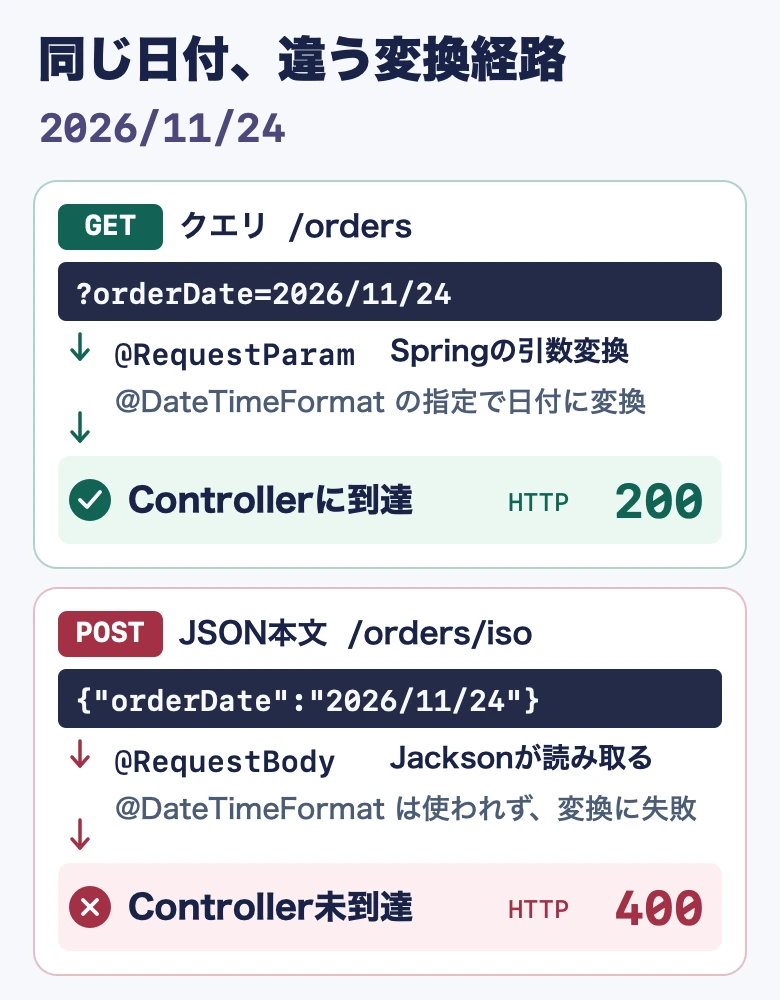
@DateTimeFormatと@JsonFormatは、日付を変換する担当が違う
GETの引数は @RequestParam で文字列を受け取ります。Spring MVCの変換処理が LocalDate に合わせ、引数の @DateTimeFormat(pattern = "yyyy/MM/dd") を使います。2026/11/24 はこの書式に合うため、メソッドへ LocalDate が渡ります。
POSTのJSONでは、メソッド引数を用意するために @RequestBody のHTTPメッセージコンバーターが動きます。このサンプルではJacksonが JSON の orderDate を DTO の LocalDate へ変換します。DTOに付けた @DateTimeFormat は、ここでの日付の読み方を変えません。/orders/iso では、日付の表記をハイフンにすると同じ日付で成功するため、LocalDate が使えないわけでもありません。
スラッシュ形式で失敗したときの例外は HttpMessageNotReadableException でした。この時点ではメソッド本体に入っていないので、Controllerの先頭に置いたログやServiceのログが出ないことがあります。@Valid や入力検証のルールを足しても、読み取りが失敗した段階は先に進みません。逆に、別の400で MethodArgumentNotValidException が出ていれば、JSONの読み取り後に、入力条件を検証する段階を調べます。
ここで前提にしているのは、Spring Boot 3.5.16で標準構成のJacksonを使う場合です。プロジェクトがJSON用のコンバーターや ObjectMapper を差し替えているなら、その設定と、実際に届いたデータを確認します。GETとPOSTというHTTPメソッドそのものが変換方式を決めるわけではなく、@RequestParam と @RequestBody という受け取り方が違います。

ISO形式が仕様なら送信側、スラッシュが仕様ならDTOを直す
API仕様がISO形式なら、JSONを2026-11-24にそろえる
まず連携先との契約を確認します。APIの仕様書が yyyy-MM-dd なら、実際の送信データを開き、"orderDate":"2026-11-24" にそろえます。画面ではスラッシュ表示を続けても、送るJSONは契約どおりに作れます。ここでサーバー側をスラッシュへ変更すると、ハイフン形式で送っていたほかの利用者が壊れる可能性があります。
/orders/iso の比較用DTOには @DateTimeFormat をあえて残しています。付けてもスラッシュが通らないことを、GETと並べて観察するためです。既存コードに同じ記述がある場合、そのアノテーションがJSONに効くという説明は削り、契約で必要なJSONの形式を明記します。
スラッシュ形式が仕様なら、JSON入力用の項目に@JsonFormatを指定する
外部システムとの既存の約束で 2026/11/24 を受け取るなら、SlashDateBody の orderDate に @JsonFormat(pattern = "uuuu/MM/dd", lenient = OptBoolean.FALSE) を付けます。uuuu はJavaの日時フォーマッターで年そのものを表す記号で、yyyy は紀元内の年を表します。ここでは厳密な日付解決で年を確定できるよう uuuu を選びます。
形式が合うだけでは足りません。2026年には2月29日がないため、2026/02/29 は400になる必要があります。Jackson 2.21.4で lenient = OptBoolean.FALSE だけを外すと、この入力が 2026-02-28 に補正されて200になり、不正日を拒否する1テストだけが落ちました。pattern を指定したから正しくない日付も拒否するだろう、と考えず、期待値をテストに置きます。
また、スラッシュ契約の修正例は 2026-11-24 を受け付けません。両方の形式を受ける期間が必要なら、互換性の方針を決めたうえで、両方の成功と不正日の失敗を別々にテストします。
このサンプルは入力用DTOと返却用DTOを分けています。JSONの受け取りにスラッシュを選んでも、レスポンスは既存のISO形式を維持できます。LocalDate 自体にスラッシュやハイフンが保存されるわけではなく、JSONを読むときと書くときの文字列の契約を別に扱います。
OrderDateController.java 全文
package info.syachiku.jsondate;

import com.fasterxml.jackson.annotation.JsonFormat;
import com.fasterxml.jackson.annotation.OptBoolean;
import jakarta.servlet.http.HttpServletRequest;
import java.time.LocalDate;
import org.springframework.format.annotation.DateTimeFormat;
import org.springframework.web.bind.annotation.GetMapping;
import org.springframework.web.bind.annotation.PostMapping;
import org.springframework.web.bind.annotation.RequestBody;
import org.springframework.web.bind.annotation.RequestMapping;
import org.springframework.web.bind.annotation.RequestParam;
import org.springframework.web.bind.annotation.RestController;

@RestController
@RequestMapping("/orders")
public class OrderDateController {
    static final String RECEIVED_ORDER_DATE = "receivedOrderDate";

    @GetMapping
    public ParsedDate getByDate(
            @RequestParam("orderDate") @DateTimeFormat(pattern = "yyyy/MM/dd") LocalDate orderDate,
            HttpServletRequest request) {
        return accept(orderDate, request);
    }

    @PostMapping("/iso")
    public ParsedDate postIso(@RequestBody MvcDateBody body, HttpServletRequest request) {
        return accept(body.orderDate(), request);
    }

    @PostMapping("/slash")
    public ParsedDate postSlash(@RequestBody SlashDateBody body, HttpServletRequest request) {
        return accept(body.orderDate(), request);
    }

    private ParsedDate accept(LocalDate orderDate, HttpServletRequest request) {
        // 検証用:Controllerに届いた値を、このリクエストの中だけに記録する。
        request.setAttribute(RECEIVED_ORDER_DATE, orderDate);
        return new ParsedDate(orderDate);
    }

    public record MvcDateBody(@DateTimeFormat(pattern = "yyyy/MM/dd") LocalDate orderDate) {}

    public record SlashDateBody(
            @JsonFormat(pattern = "uuuu/MM/dd", lenient = OptBoolean.FALSE) LocalDate orderDate) {}

    public record ParsedDate(LocalDate orderDate) {}
}HTTPステータスだけでなく、メソッドに入ったかも確認する
テストは、成功ならHTTP 200とレスポンスの日付に加え、Handlerが実際に受け取った LocalDate を確認します。失敗なら、HTTP 400、HttpMessageNotReadableException、メソッドに入った印がないことを確認します。単に400を期待すると、別の検証エラーでもテストが通ってしまうためです。
サンプルでは、メソッド本体がリクエスト属性に受け取った日付を置きます。この属性はステータスやレスポンスを変えるためではなく、テストでControllerに入ったかを見るための印です。現場のコードでは、テストしやすければServiceを呼んだかどうかを確認する方法もあります。
OrderDateControllerTest.java 全文
package info.syachiku.jsondate;

import static org.junit.jupiter.api.Assertions.assertEquals;
import static org.junit.jupiter.api.Assertions.assertInstanceOf;
import static org.junit.jupiter.api.Assertions.assertNull;
import static org.springframework.test.web.servlet.request.MockMvcRequestBuilders.get;
import static org.springframework.test.web.servlet.request.MockMvcRequestBuilders.post;
import static org.springframework.test.web.servlet.result.MockMvcResultMatchers.handler;
import static org.springframework.test.web.servlet.result.MockMvcResultMatchers.jsonPath;
import static org.springframework.test.web.servlet.result.MockMvcResultMatchers.status;

import java.time.LocalDate;
import org.junit.jupiter.api.Test;
import org.springframework.beans.factory.annotation.Autowired;
import org.springframework.boot.SpringBootConfiguration;
import org.springframework.boot.autoconfigure.EnableAutoConfiguration;
import org.springframework.boot.test.autoconfigure.web.servlet.AutoConfigureMockMvc;
import org.springframework.boot.test.context.SpringBootTest;
import org.springframework.context.annotation.Import;
import org.springframework.http.MediaType;
import org.springframework.http.converter.HttpMessageNotReadableException;
import org.springframework.test.web.servlet.MockMvc;
import org.springframework.test.web.servlet.MvcResult;
import org.springframework.test.web.servlet.ResultActions;

@SpringBootTest(classes = OrderDateControllerTest.SampleApplication.class)
@AutoConfigureMockMvc
class OrderDateControllerTest {
    private static final LocalDate EXPECTED = LocalDate.of(2026, 11, 24);

    @SpringBootConfiguration
    @EnableAutoConfiguration
    @Import(OrderDateController.class)
    static class SampleApplication {}

    @Autowired MockMvc mvc;

    @Test
    void getSlashUsesDateTimeFormat() throws Exception {
        assertReceived("get-slash", "getByDate",
                mvc.perform(get("/orders").queryParam("orderDate", "2026/11/24")));
    }

    @Test
    void postSlashWithDateTimeFormatDoesNotEnterController() throws Exception {
        assertUnreadable("post-slash-with-date-time-format", "postIso",
                postJson("/orders/iso", "2026/11/24"));
    }

    @Test
    void postIsoWithSameDtoReceivesLocalDate() throws Exception {
        assertReceived("post-iso", "postIso", postJson("/orders/iso", "2026-11-24"));
    }

    @Test
    void postSlashWithJsonFormatReceivesLocalDate() throws Exception {
        assertReceived("post-slash-with-json-format", "postSlash",
                postJson("/orders/slash", "2026/11/24"));
    }

    @Test
    void slashContractRejectsNonexistentDayInsteadOfCorrectingIt() throws Exception {
        assertUnreadable("post-slash-nonexistent-day", "postSlash",
                postJson("/orders/slash", "2026/02/29"));
    }

    @Test
    void slashContractAlsoRejectsIsoInput() throws Exception {
        assertUnreadable("post-iso-to-slash-contract", "postSlash",
                postJson("/orders/slash", "2026-11-24"));
    }

    private ResultActions postJson(String path, String input) throws Exception {
        return mvc.perform(post(path).contentType(MediaType.APPLICATION_JSON)
                .content("{\"orderDate\":\"" + input + "\"}"));
    }

    private void assertReceived(String scenario, String method, ResultActions request) throws Exception {
        MvcResult result = request.andExpect(handler().methodName(method))
                .andExpect(status().isOk())
                .andExpect(jsonPath("$.orderDate").value("2026-11-24"))
                .andReturn();
        var received = result.getRequest().getAttribute(OrderDateController.RECEIVED_ORDER_DATE);
        assertInstanceOf(LocalDate.class, received);
        assertEquals(EXPECTED, received);
        assertNull(result.getResolvedException());
        report(scenario, result, received);
    }

    private void assertUnreadable(String scenario, String method, ResultActions request) throws Exception {
        MvcResult result = request.andExpect(handler().methodName(method))
                .andExpect(status().isBadRequest())
                .andReturn();
        assertInstanceOf(HttpMessageNotReadableException.class, result.getResolvedException());
        var received = result.getRequest().getAttribute(OrderDateController.RECEIVED_ORDER_DATE);
        assertNull(received, "マッピングは一致するが本文の読み取りに失敗し、Controllerは実行されない");
        report(scenario, result, received);
    }

    private void report(String scenario, MvcResult result, Object received) {
        var exception = result.getResolvedException();
        System.out.printf("%s: status=%d, entered=%b, received=%s, exception=%s%n",
                scenario, result.getResponse().getStatus(), received != null,
                received == null ? "-" : received,
                exception == null ? "-" : exception.getClass().getSimpleName());
    }
}レビューで「JSONの日付に @DateTimeFormat を足しました」と言われたら、「失敗した送信データとAPI仕様の表記を見せてください。スラッシュを受ける仕様なら、@JsonFormat のテストで正常な日と、存在しない日を別々に確認しましょう」と返せます。固定のURLだけで試すより、MockMvcで有効な日付を通し、間違った入力がControllerに到達しないことまで確かめると、修正の範囲を説明しやすくなります。
セルフチェック:400を返した段階と、直す側を説明できるか
Controllerの引数が、HTTPリクエストからどのように用意されるかをまとめて学びたい場合は、『Spring徹底入門 第2版』のSpring MVCとRESTful Webサービスの章が役立ちます。読んだあとに自分の画面とAPIを一つずつ選び、値をどの経路で受け取っているか説明できると、この400を切り分けやすくなります。

Spring徹底入門 第2版
アプリを作った後に、DIやDB更新の仕組みを調べる。
DI、MVC、データアクセス、テスト、セキュリティまで幅広く確認できます。小さなWebアプリを一通り作り、Springの仕組みを詳しく学びたい人に向く参考書です。
- Springで小さなWebアプリを作ったことがある
- DIやトランザクションの仕組みを確認したい
Spring Framework 5向けです。Boot 3の実装に使うコード・設定は、採用している版の公式資料と照合してください。
当サイトはAmazonアソシエイト・プログラムの参加者です。価格・在庫・配送条件はAmazonでご確認ください。
この記事とあわせて読みたい

まとめ
- GETの
@RequestParamとPOSTの@RequestBodyでは、日付に文字列を変換する担当が違います。この例では同じ2026/11/24がGETでは200、JSONでは400でした。 - API仕様がISOなら送信側のJSONを
2026-11-24へ。スラッシュ形式が既存契約なら、JSON入力用のDTOに@JsonFormatを指定します。 - 修正後は、正しい日付で受け取った
LocalDateと、存在しない日や形式違いがControllerに届かないことを確認します。
公式資料:Spring MVC:引数の型変換、Spring MVC:リクエスト本文、Java 17:DateTimeFormatterのパターン文字
